
Think about how you work with a new hire. In their first week, you give them small, well-scoped tasks, like triaging a bug report or updating a doc. Soon you're giving them bigger tasks, and eventually you're handing them a lofty goal and letting them figure out how to tackle it. They still come to you with clarifying questions or review requests, just less often over time.
Agents have gotten good enough that you can onboard them the same way, and like a good new hire, they're turning into proactive problem solvers. Personal agents like Muse, Instinct, and OpenAI's dots popularized proactive agents, which run in the background and work toward larger goals instead of waiting for a prompt. Hone puts it most directly, describing its Engines as AI that is "assigned goals rather than tasks." Goals let these agents take on harder problems that play out over days or weeks.
A proactive agent still checks in with you when it's unsure what you want or needs your sign-off before something goes out. When your direct reports get really good at their jobs, you might find that you've become the bottleneck, and the same is true for agents. As they take on more goals, your attention becomes the scarce resource. We think two things are essential to building proactive agents that use it well: memory and UX.
Proactive agents
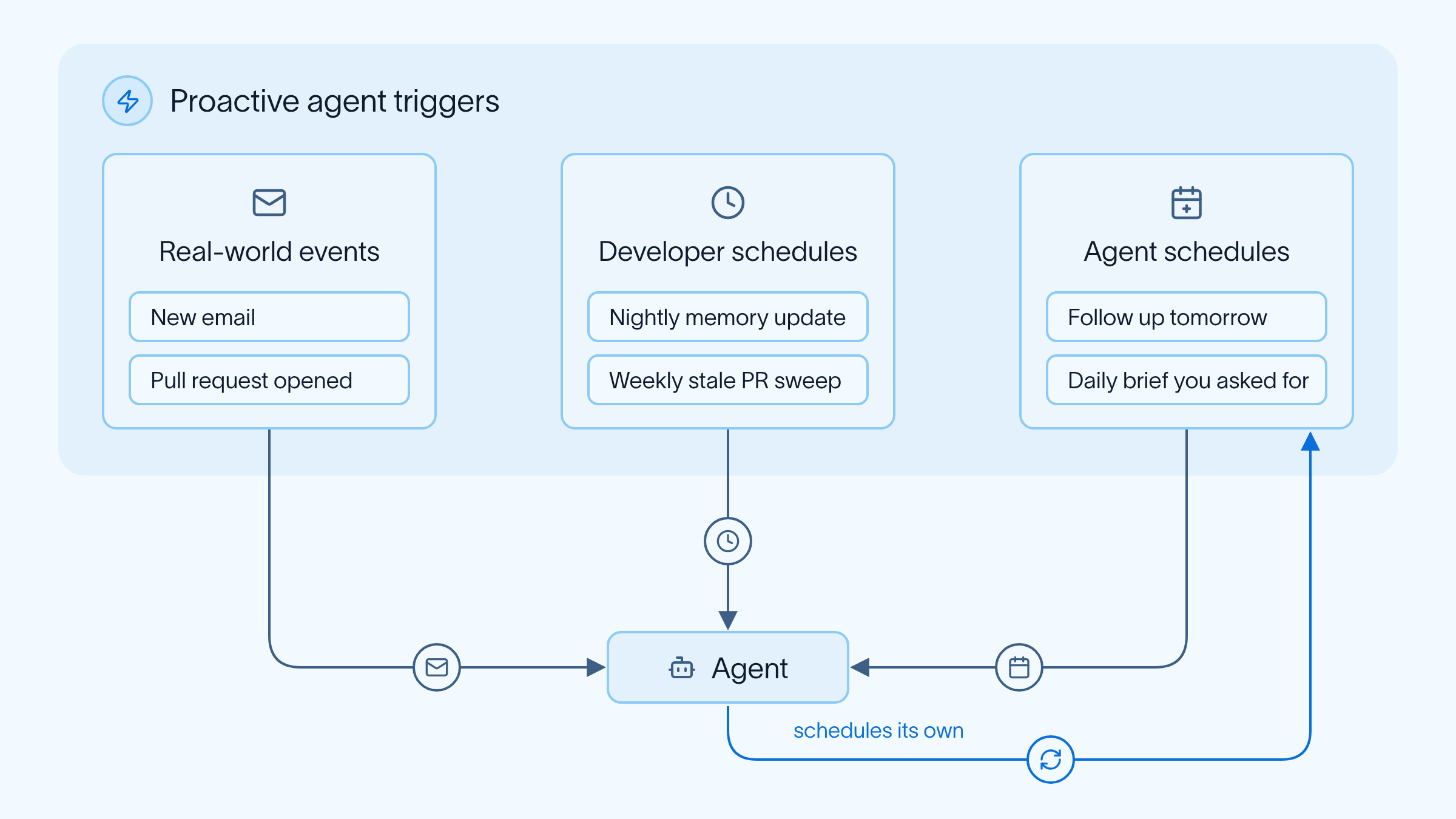
A proactive agent responds to events in its environment, which come from three places:
- Real-world events, like a new email or a newly opened pull request.
- Schedules set by the developer, like a nightly job that updates the agent's memory or a weekly sweep for stale pull requests.
- Schedules set by the agent, like a reminder to follow up on a thread tomorrow, or a daily brief a user asked for.
The examples throughout come from two proactive agents we run internally at LangChain:
- GTM Agent, our sales agent, watches for new leads and replies, sends daily briefs, and drafts outbound emails.
- Robin (formerly Open SWE), our engineering agent, drafts pull requests and reviews every new one.
These agents operate on all three types of triggers. A few examples: Robin's reviews start from a real-world event, a newly opened pull request, and GTM Agent's daily brief runs on a schedule it created itself after a user requests one. We built both agents on Managed Deep Agents, where more than 70% of runs now come from schedules rather than an ad hoc human prompt.
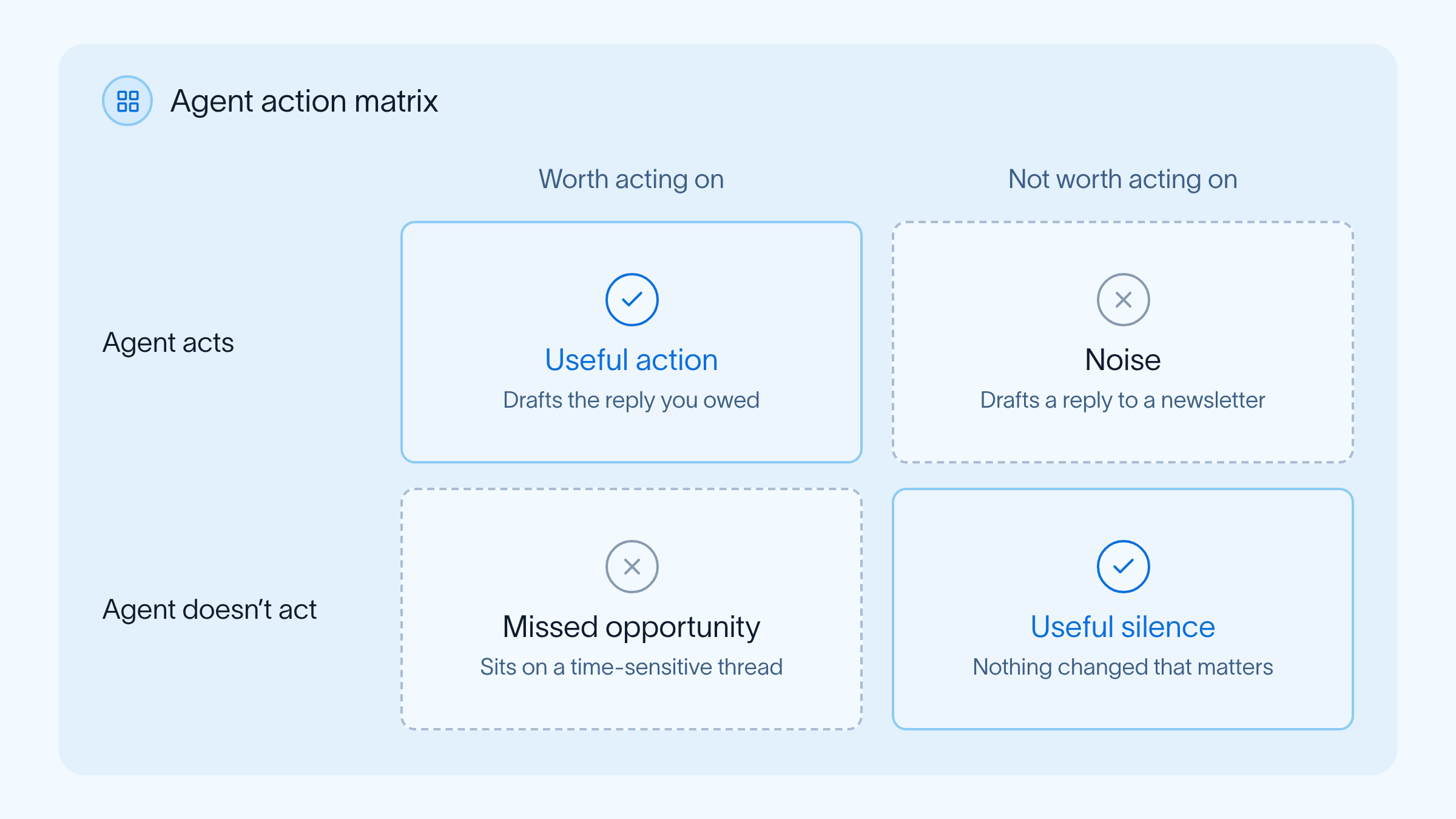
A proactive agent decides for itself when to come to you, and each check-in costs you some attention. It has to be proactive without being annoying. For an executive assistant agent that watches your inbox, that means flagging the message from your boss about tomorrow's launch without also flagging every newsletter. The agent can only tell the two apart if it knows what matters to you, and that knowledge comes from memory.
Memory makes an agent better over time
Memory is the information an agent learns over time. When a proactive agent wakes up from a schedule or an event, there's no prompt from you saying what you want. It can pull in fresh context through its connectors, like your inbox or calendar, but what it has learned about your preferences comes from memory. Memory is also how it gets better at its job, and a big part of that job is knowing what's worth bothering you about.
Where memory comes from
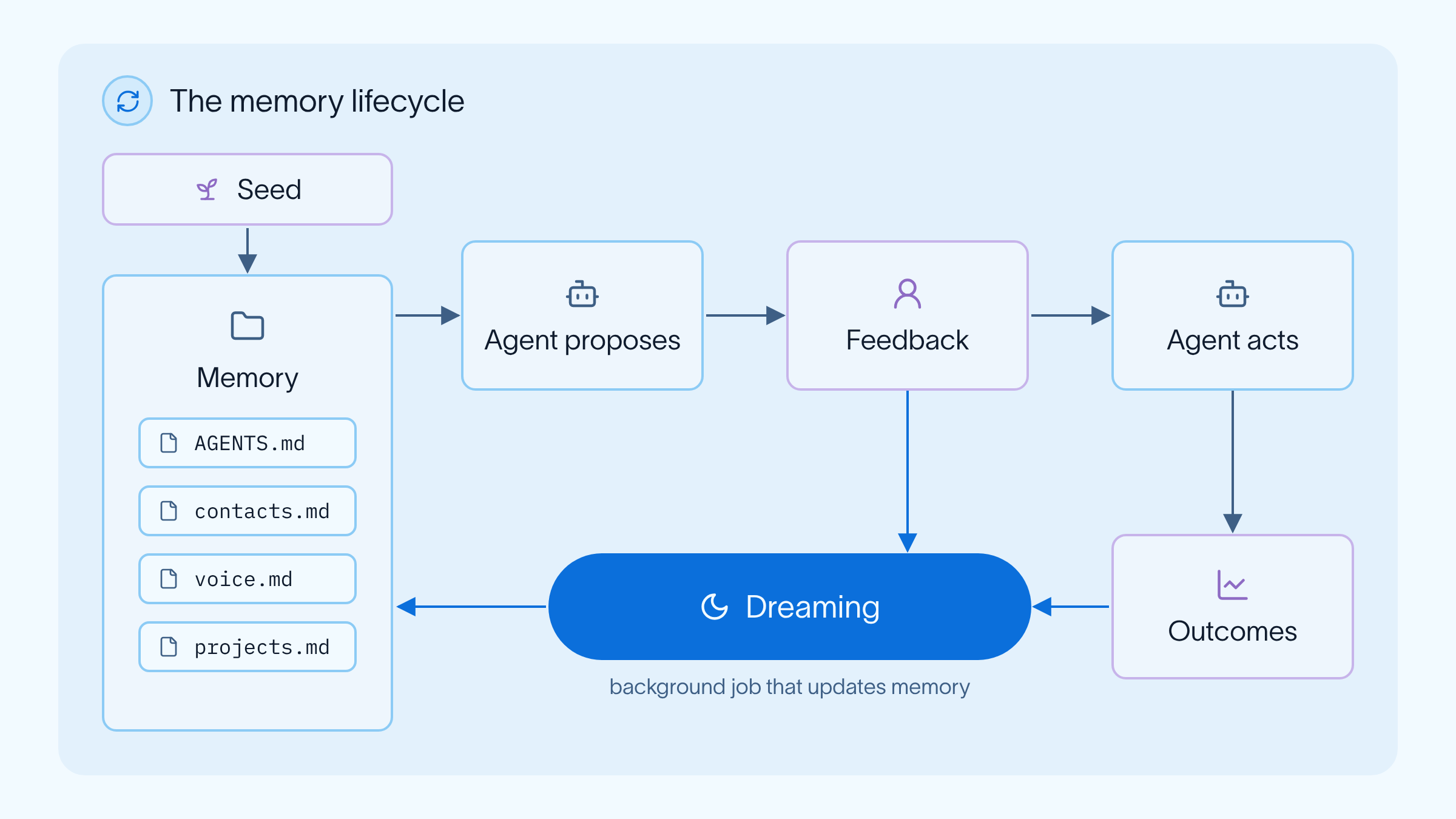
An agent's memory comes from three kinds of signal, each tied to a different point in time. We'll keep using the executive assistant as the running example. Its goal is keeping your inbox under control, so as new mail comes in, it drafts replies and flags the emails that need you.
- Seed (past): precedent and existing context. You can seed memory before the first run, for example from your sent folder, so the assistant starts out knowing how you write and who you work with.
- Feedback (present): your response to what the agent proposes. When you rewrite a draft or reject it with a reason, the agent learns more about your voice.
- Outcomes (future): what happens after the agent acts. When an email it drafted gets a reply, the agent learns what works.
Maintaining memory is hard
Storing memories is the easy part, since memory is often as simple as a file. Keeping it useful as it grows is harder, because an agent acts on whatever it remembers. Three problems come up:
- Salience: deciding what's worth saving and how important each piece of information is.
- Expiry: knowing when information goes stale, like a launch date that has already passed.
- Duplication: merging new information into what's already stored instead of saving a second copy that later contradicts the first.
Many proactive agents handle this with "dreaming," a scheduled background job that reads through the agent's recent traces and updates its memory before the next run.
Another hard part is judging whether memory is helping. One way is to pick the outcomes a well-designed memory system should improve and track them. For the executive assistant, that might be how long its drafts take to get approved, or how often the emails it sends get replies. For any proactive agent, the share of its check-ins you actually act on is worth watching too.
Memory enables autonomy
The best new hires are coachable. They're receptive to feedback and climb a steep learning curve, so they quickly stop repeating mistakes you've already corrected. A mentor once told me that you can judge the value of an employee by how much important work you can trust them to take off your plate.
Agents work the same way, and memory is what builds the trust. An agent that remembers your feedback stops making the same mistakes, which earns it more autonomy and makes it more useful without you in the loop. For the executive assistant, that might mean letting it book meetings on its own once you've stopped changing the times it proposes.
UX design for proactive agents
A proactive agent reaches out without being asked, usually with a question to answer or an action to approve. How it presents those decides whether you engage with it or mute it. Three things have mattered most for our internal agents.
High signal
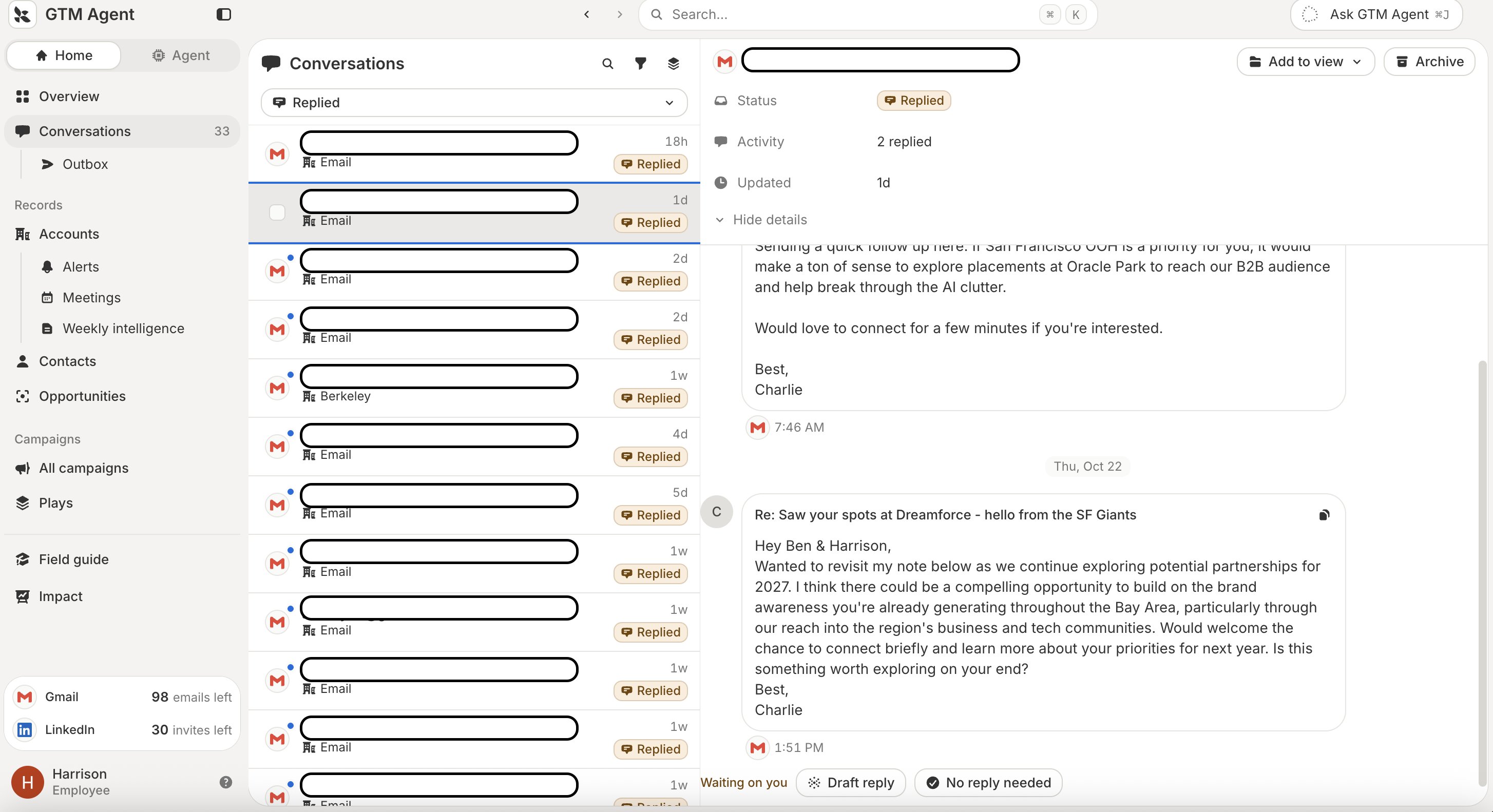
An agent should surface only what's valuable. A new email arriving doesn't necessarily mean the agent should do anything about it. GTM Agent's review UI sorts conversations into ones waiting on you, ones that need a draft reply, and ones that need no reply at all.
Slack threads need the same judgment. An agent that chimes in unannounced while you're talking with a teammate is annoying, so with Robin we use Jev as a decision model for when it should join a conversation. This lets Robin watch the conversation and participate when it has something to add, rather than forcing its way in or only acting when someone remembers to tag it.
Built for review
Every check-in should be fast to review, because review is how your feedback gets back into memory. That feedback is how the agent picks up your taste and judgment, which for open-ended work are often the most important context it can get and are rarely written down anywhere. An agent you like working with also gets more of it. Goal Engineering makes the same point:
You will want to align an agent's goals to what is easiest for humans to review. This allows you to create a delightful review UX, extract the most information possible, and enable your agents to continually learn so they can be increasingly useful and autonomous over time.
GTM Agent drafts outbound emails, and working through a backlog of them in Slack was slow, so we built a custom UI for it:
Where you already work
Our agents live in Slack, where you can DM them or tag them in a channel, and where teammates can see how others use them. Scheduled work shows up there too. Once you invoke an agent in a thread, it can schedule its own follow-ups and post reports back into that thread. GTM Agent's daily brief arrives as a Slack message next to the conversations you're already having, rather than in a separate dashboard you'd have to remember to check. We keep these posts short so they're easy to digest.
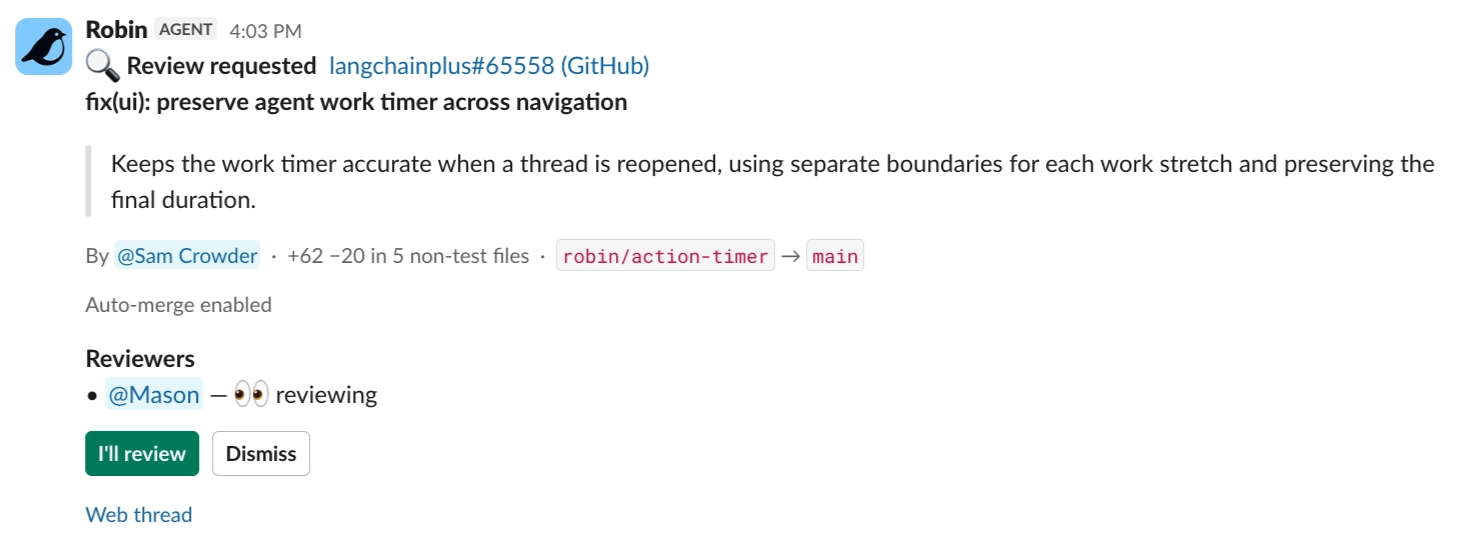
Similarly, Robin leads with a one- or two-sentence headline and puts the detail in a thread reply, so you can tell at a glance whether something needs you. When Robin opens a pull request, it asks for a review in Slack with a one-line summary, the size of the change, and a button to claim it.
The proactive agent era
For the last three years, building agents has been an exercise in context engineering: giving the model the right context, at the right time, for the task. And don’t be fooled: context engineering for models is still important. But now we have other fun challenges, too!
The new challenge we’re faced with in this era of proactive agents is practicing the same discipline for humans, giving you the right context, in the right format, at the right time, in service of the goal. People have a finite context window too, with only so much time and attention to give. When memory and UX work together, an agent's check-ins get sharper and less frequent over time, the way a coachable new hire's do.
You can build proactive agents today with Managed Deep Agents, which supports schedules, memory, and async subagents. To build on the open source harness directly, start with memory and async subagents in Deep Agents, which work the same way in JavaScript.