

Key Takeaways
- Not all turns need your best model. We measured 7%, and those calls carried 68% of the bill
- Routing is a trade. 74% cheaper for about six points of accuracy reduction
- Run the cost tradeoff formula before you build anything. Judge cost divided by the price gap gives the offload you need. If your two models are close in price, that number climbs past 100% and routing cannot pay unless you host the cheap model yourself
Agents make a lot of LLM calls, and most teams send every one of them to the same model. NVIDIA NeMo Switchyard is an open source model routing library that automates model selection across agent workflow steps, so work that does not need a frontier model does not go to one.
We ran our Deep Agents evaluation suite through Switchyard and measured how many turns the router sent to a frontier model. The answer was 7%. A 30B parameter model handled the other 93%. Routing between NVIDIA Nemotron 3.5 Lightning and Claude Opus 4.8 cut the total cost by 74% against running Opus alone, while retaining 93% of its accuracy for the same calls.
Below is what we measured, and a formula that tells you when to consider the same strategy for your own workload.
The problem with picking one model
Sending every call to one model was a reasonable default when models were cheaper and closer together in capability. That has changed. Frontier models have gotten more expensive and more capable, while open weight models have gotten fast and cheap enough to handle a real share of what an agent does, though not all of it. Meanwhile a "read this file" turn and a "figure out why this test is failing" turn still go to the same model at the same price per token, even though one is trivial and the other is not.
How many turns actually need the expensive model is what decides whether routing pays. We already run benchmark suites against Deep Agents, so we pointed one at a router instead of a model.
What Switchyard does
Switchyard is NVIDIA's open source routing library. It automatically routes each agent query across any combination of closed and open models based on the strategies you configure for each step. You can run it as a proxy your agent points at, or as middleware inside your agent process.
It ships two routing approaches, with a third in research, and they trade latency against accuracy differently:
- LLM classifier. A small judge model informs the routing decision. It runs in one of three modes: capability picks a target per call, escalation starts every task cheaply and promotes a session to a larger model after repeated bad turns, and custom lets you define your own. This gives you higher accuracy potential at the cost of an extra call to a small model.
- Stage router (heuristic). NVIDIA describes it as routing by workflow stage, reading error patterns, reasoning patterns, and token counts. It adds no extra model call and costs close to nothing in latency. It only fires if your agent's traffic produces the signals it looks for, and we did not benchmark it.
- Prefill-activation MLP. Routes on model internals, reading activation patterns at prefill. Research stage rather than production ready, but it is the direction NVIDIA is exploring.
We benchmarked the LLM classifier in escalation mode, which is type = "llm_classifier" in the config further down. Escalation starts every task on the cheaper model. A small judge model reads each completed turn and votes on whether the agent is on track. Two consecutive negative verdicts route that task to the expensive model going forward. This one-way door reduces routing cost because the task escalation keeps the judge model from running on each turn.
.png)
What we measured
Our Deep Agents evaluation suite is 145 multi-step agentic tasks, averaging 6.3 model calls each, whose tool operations map to production workloads:
- Customer support dialogue under policy constraints.
- On-call incident investigation.
- Multi-step workflow automation across messaging, issue tracking, and email.
The evals span tool use, multi-step retrieval, filesystem operations, and long-context summarization, with scenarios drawn from τ²-bench airline, the Berkeley Function Calling Leaderboard, FRAMES, and Nexus. You can review the evals themselves here.
One scoping note before sharing the results. These evals are run in controlled scenarios. The benefit of this approach is that we can attribute failures to the cause straightforwardly. However, the tradeoff of this control is that it also leaves the suite saturated: accuracy was high across all three workload types, with just 8 points of variance between a 30B parameter model and a frontier model. That gives routing less room to prove its value than a harder workload would. Treat what follows as a measurement of one workload rather than a forecast for yours. All costs price cached input at the cache rate, which is what an invoice shows.
The split between where the calls went and where the money went is the core finding. Nemotron 3.5 Lightning handled 93% of model calls for 10.4% of the spend, while Opus handled 7% of calls for 68.4% of it. The frontier model was used far less often than a single-model setup assumes, and the last six points of accuracy cost 3.5x more per completed task.
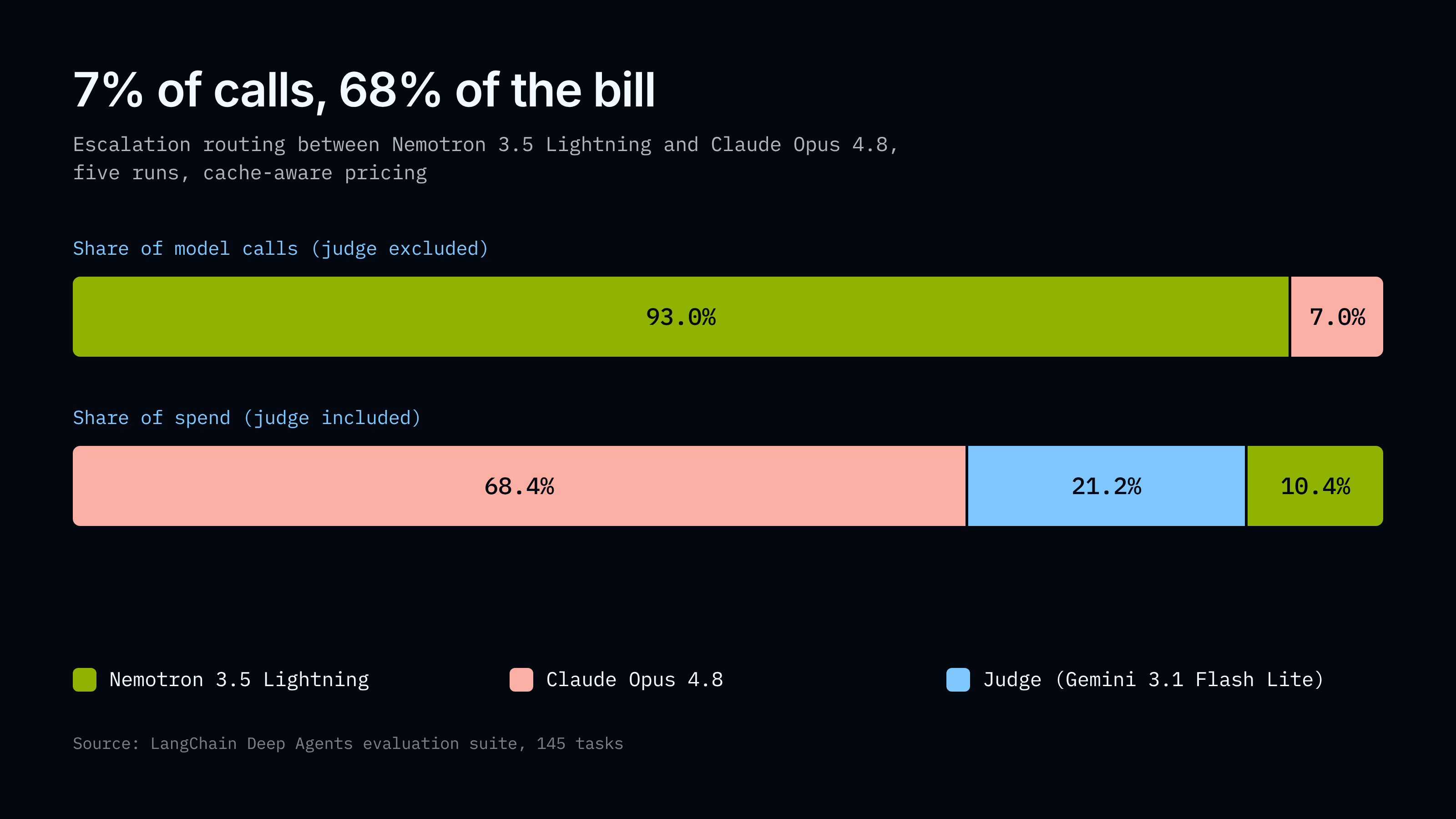
The judge took the remaining 21.2% of spend. It runs on every turn until a task escalates, and unlike the frontier model it gets no benefit from prompt caching, so it lands as the second largest line item in the routed arm, about a third of what Opus costs. So if you want to cut routed cost, the judge model is worth optimizing, not just the escalation rate.
- The accuracy cost is real. Routing was 74% cheaper and 6 points less accurate. Individual runs vary by about 2.7 points, so a 6-point gap is well outside that noise.
- The value came from moving traffic away from the frontier model, not toward it. Sending the easy work to the cheap model is where the savings came from. Moving a task to Opus when the cheap model struggled scored 2.3 points better than running the cheap model on everything. That is less than runs vary on their own, so we cannot say routing beat the cheap model here.
- Cost held steady across runs. Opus’s cost varied only 1.5% across its three runs, so the 74% figure rests on a stable baseline. Per-run savings ranged from 68.5% to 81.1%, for reasons in the next section.
Budget for a range, not a number
Frontier traffic across our five runs ranged from 4.1% to 9.1%, a mean of 6.9%, with the heaviest run escalating more than twice as often as the lightest. An Opus call cost $0.0324 against Nemotron 3.5 Lightning’s $0.00037, about 87x, so that variation drove a cost range of $2.16 to $3.61. Nothing changed between those runs except which turns the router decided to escalate, and the bill still moved by 67%.
That is the trade you take on with a router: it lowers your average spend and widens the range around it. Plan against the top of that range. If you want to narrow it, the strike count is the highest-leverage setting you have. It is confirmations in the config below, and it sets how many bad turns the judge must see before moving a task to the frontier model. Lower it and you escalate more often, and those are the expensive calls. The judge itself is the other lever: it took 21.2% of routed spend, so a cheaper judge model, or one that skips turns that are clearly going fine, comes straight off your bill.
The obvious objection
Nemotron 3.5 Lightning alone scored 77.7% for $0.72 a run, against 86.0% for $11.45 running Opus alone and 80.0% for $3.00 routed. Why use a model router at all?
Routing scored 2.3 points above the cheap model and cost 4.2x as much. That gap is smaller than the 2.7 points runs vary on their own, so we cannot say routing beat the cheap model here. It is worth saying plainly that the cheap model did well. Only 8 points separate Nemotron 3.5 Lightning from a frontier model on this suite. This is one workload, so check it against your own before you act on it.
The comparison also has hindsight in it. We know how these 145 tasks turned out. In production you do not know whether the request that just arrived is easy or hard, and running the cheap model on everything means taking its answer on the hard ones too. Routing is the cost of not having to guess, and it lowers your cost ceiling as well: our worst routed run cost $3.61, about a third of Opus alone.
So if minimum cost is your priority and your traffic looks like this workload, Nemotron 3.5 Lightning alone is the better choice. Routing is for teams who need frontier capability on the hard requests and cannot tell in advance which ones those are.
Whether this trade is worth taking on your workload
Using a router reduces total cost relative to a frontier model on its own only when the share of turns you send to a smaller model clears this bar:
minimum offload = judge cost / (expensive cost - cheap cost)
The judge is a fixed tax on every run. It runs on every turn until a task escalates, whether or not anything ends up escalating. So the question is never "is my cheap model good enough?" It is "is the gap in price between my two models wide enough to pay for the judge?"
For our pairing, the judge model cost $0.64 per run against a price gap of $10.73, so we needed to offload 5.9% of turns. We offloaded 93%, clearing the bar by 16x. It was not close, so with a pairing this lopsided the formula is a bit of a formality. The formula is more useful with a narrower spread, where the answer is less obvious.
The formula can also rule routing out. If your two models are close in price, the savings on each offloaded turn are small, and the formula asks you to send more than 100% of your turns to the cheap model, which is impossible. No judge configuration fixes that. The exception is a locally hosted cheap model. Run it yourself on something like an NVIDIA DGX Spark and its inference cost is near zero, which widens the gap enough to make routing worth it again.
The formula cannot tell you whether this router will make good choices on your traffic. It only tells you whether good choices would be worth paying for. Use it to rule routing out on cost. Run your own workload to rule it in.
When not to use this
- You are latency-sensitive. The judge is a second model call per turn, roughly 700ms against effectively zero for the stage router
- Your workload is short. Escalation needs multi-turn trajectories to have anything to read
Getting started
There are two ways to run Switchyard with Deep Agents, and they suit different goals.
Reproducing what we measured
Our numbers come from escalation mode, which is a route configuration on the Switchyard server. Start the server from NVIDIA-NeMo/Switchyard, point your agent's base_url at it, and describe your models in a config file.
schema_version = 1

[llm_clients.nvidia]
format = "openai_chat"
base_url = "https://integrate.api.nvidia.com/v1"
api_key_env = "NVIDIA_API_KEY"

[llm_clients.anthropic]
format = "anthropic_messages"
base_url = "https://api.anthropic.com"
api_key_env = "ANTHROPIC_API_KEY"

[llm_clients.gemini]
format = "openai_chat"
base_url = "https://generativelanguage.googleapis.com/v1beta/openai"
api_key_env = "GOOGLE_API_KEY"

[targets.weak]
id = "nvidia/nemotron-3.5-lightning-30b-a3b"
llm_client = "nvidia"

[targets.strong]
id = "claude-opus-4-8"
llm_client = "anthropic"

[targets.judge]
id = "gemini-3.1-flash-lite"
llm_client = "gemini"

[routes.switchyard]
id = "switchyard"
type = "llm_classifier"
mode = "escalation"
weak_target = "weak"
strong_target = "strong"
classifier_target = "judge"

[routes.switchyard.escalation]
confirmations = 2      # strikes before switching to the strong model
Switchyard translates between formats, so the three models above speak OpenAI Chat, Anthropic Messages, and OpenAI Chat while your agent speaks only OpenAI Chat.
Routing inside your agent
There is now also a Switchyard middleware for Deep Agents. Routing happens in-process with no separate service to run, and any LangChain chat model can be a routing target. Tool binding, callbacks, tracing, and structured output all keep working, and every response carries the routing trace in response_metadata["switchyard"], with selected_model for the final pick and decisions for the ordered trace when an algorithm decides more than once.
from deepagents import create_deep_agent
from langchain_openrouter import ChatOpenRouter
from switchyard.libsy import LlmTarget, algorithms
from langchain_nvidia_switchyard import LangChainLlmClient, SwitchyardRoutingMiddleware

# Swap in whichever pair you want to route between.
efficient_model = ChatOpenRouter(model="nvidia/nemotron-3.5-lightning-30b-a3b")
capable_model = ChatOpenRouter(model="anthropic/claude-opus-4.8")

# Argument order matters: capable target first, efficient target second.
router = algorithms.stage_router(
    LlmTarget("capable", LangChainLlmClient(capable_model)),
    LlmTarget("efficient", LangChainLlmClient(efficient_model)),
    picker="efficient_first",
    confidence_threshold=0.5,
    recent_window=3,
)

# Deep Agents still needs a base model. The middleware substitutes its own
# choice per call, so reusing a configured target avoids an unused third model.
agent = create_deep_agent(
    model=efficient_model,
    middleware=[SwitchyardRoutingMiddleware(router)],
)

result = await agent.ainvoke(
    {"messages": [{"role": "user", "content": "Summarize the important files in this project."}]}
)
The middleware is experimental and not published as a package yet. You clone both Switchyard and langchain-nvidia and install them locally, on Python 3.12 or newer with deepagents 0.7.4 or later. It offers stage routing, an LLM task classifier, random, and noop. Our numbers come from the server's LLM classifier route in escalation mode, which is a route configuration rather than a middleware algorithm, so the example above will not reproduce them directly. Stage routing keys off tool-call and tool-result signals, which suits agents with dense tool traffic such as coding agents.
What we would test next
- A cheaper or locally hosted judge. At 21.2% of routed spend it is the most obviously improvable part of the setup.
- A harder workload. This suite is saturated, and routing has more to prove where the gap between models is wider.
- confirmations = 1. Every arm here ran at two strikes, so we can say the setting matters but not by how much.
Run it against your own work. The formula is general, but the number you put into it is yours.