
Agents are moving beyond the chat window to take on more proactive and ambient work. Instead of waiting for a prompt, they run on a schedule or are triggered by events, and they’re handling longer tasks without someone checking every step. That makes them much more useful, but it also means teams need to control which tools each agent can call and whose identity it acts with, and keep a record of every action it takes.
Today, we’re launching LangSmith Tool Gateway in Public Beta, on the LangSmith Agent Platform. Tool Gateway is a managed tool layer that handles credentials, identity, and access for every agent tool call, making it simple to govern the actions your agents take. Tool Gateway makes it easier and faster for engineering teams to grant agents access to new tools in a controlled manner and without hand-rolling auth each time. Security and compliance teams can use LangSmith to trace and audit tool calls as part of agent monitoring.
Tool governance is core to agent governance
When agents are in production, platform teams need visibility into what each agent did, controls over which tools and models it can use, and usage policies that limit spend and risk. With LangSmith, developers can build, run, and improve agents in a single platform.
LLM Gateway governs the model calls agents make. With it, you can set spend limits and model fallbacks, add rate limits, redact personal data and secrets, and provides visibility within the agent trace with rich information on model calls such as latency, fallbacks, failures, guardrails triggered, etc. Tool Gateway lives in LangSmith alongside LLM Gateway, and provides governance across this lifecycle.
Tool Gateway simplifies tool lists for agents, implementing policies on usage, managing identity for tool use, and as with LLM Gateway, provides visibility within the agent trace through rich information on tool calls such as servers, users, outcomes, latency, etc.
Together, Tool Gateway and LLM Gateway provide comprehensive visibility and governance over agent actions and spend.
How agent tool use becomes a governance problem
Agents in production need to serve hundreds or thousands of users, each with their own set of permissions. This means managing and refreshing a large volume of tokens, and carefully managing and recording access for security and audit requirements. Managing identity and visibility at scale is orders of magnitude more difficult than local development. Building this plumbing for every agent individually slows down product delivery and exposes a larger, varied surface area to security risk.
Providing agents access to tools, in production, has three requirements:
- Access: Define which tools this agent can call and which credentials it uses.
- Control: Set what each user can do with it, and establish reviews when necessary.
- Visibility: Track which tools are being called and confirm the agent used the right credentials.
The quick and dirty approach is to hard-code all three for an agent. Engineers write an OAuth flow per provider, store tokens next to the agent, and add routing for each new tool. When the goal is to build fast in a limited environment, this works. However, this breaks as usage, the number of tools, and the number of users grow.
How should agents use tools?
Let's look at this problem in context. A large US retailer we work with is building agents for store operations and inventory management. Two of those agents illustrate the challenge well.
The first is a store assistant that answers questions from associates. It runs using each associate's individual credentials, with access to inventory systems, schedules, and email. The second is an inventory agent that runs at 3 a.m. every day to reconcile stock, using its own service credentials.
The engineering team has built over 50 MCP servers exposing more than a thousand tools in total. However, each agent should only be using a small, approved subset of those tools, and each should be calling the right credentials for a given context. When teams hard-code credentials into agents or provide a complete tool server there are no deterministic checks preventing an agent from using the wrong credential or using an unapproved tool from the tool server. And because there's no end-to-end visibility into how the agents are using tools, the security team has no way to audit or verify any of it.
Tool Gateway manages access, identity and policies for every tool call
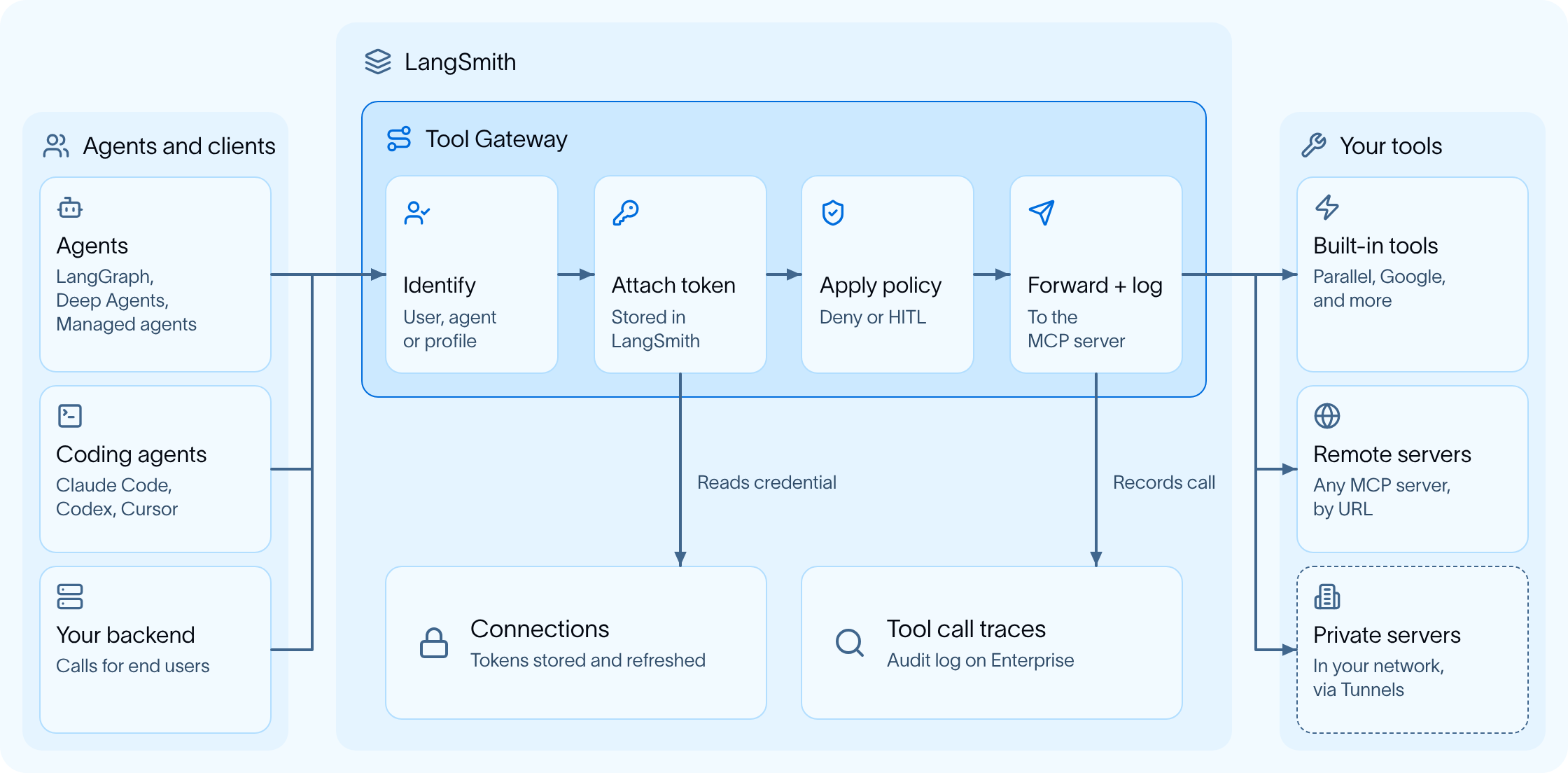
Tool Gateway is a managed tool layer that allows callers to route tool requests through a single URL. For each caller, Tool Gateway resolves identity, manages access, and logs tool call traces.
Here's how it works in practice.
Access: Define what tools an agent can use, and as whom
Tool Gateway functions as the single place where tools can be discovered and accessed. New agents get up and running faster because tool setup isn't repeated per agent, and security has a clear picture of what each agent can reach.
Register your tools once
Add any MCP server by URL, enable a built-in server for common apps like Google, Salesforce, or GitHub. Each team can find existing tools easily, and ensure usage policies are followed.
Scope each agent to only what it needs
A tool kit is a curated set of tools published at a single URL. Users can build tool kits based on their requirements and make the kit available to the workspace or scope it for personal use. When connected to a specific tool kit, an agent only sees the tools bundled in it.
Keep large kits fast and accurate with search mode
When an agent has hundreds or thousands of tools, loading all of them at once increases latency and makes selecting the right tool more cumbersome. With search mode, the agent queries its kit and loads only the tools relevant to the current task.
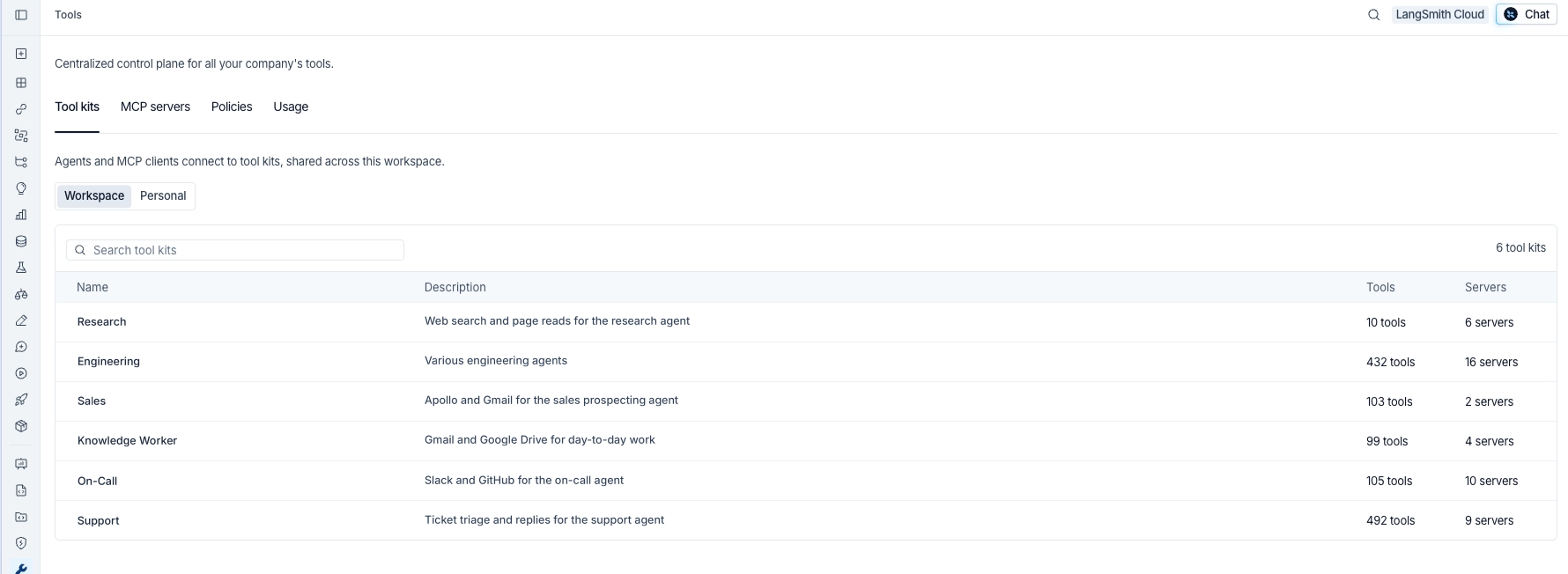
Tool Gateway resolves identity for tool calls, allowing engineering teams to move faster without having to hand-roll auth. For every tool call through the gateway, the caller maps to one of two identities:
- Acting as the user applies the user's own credentials. Your identity provider (Okta, Entra ID) identifies them, and the user connects their account once. After that, Tool Gateway uses their access on every call. If a user hasn't connected yet, the call returns a sign-in link, waits for them to authenticate, then continues automatically. This lets engineers add tool use on-behalf-of-user without additional code.
- Acting as the agent uses credentials tied to the agent itself, either through agent auth configured in LangSmith, or through a profile. Profiles use shared credentials that a workspace admin connects once for the agent. Workspace admins can set up profiles with a set of shared credentials that can be reused across agents that can run autonomously in the background.
Control: Set policies on tool use and approvals
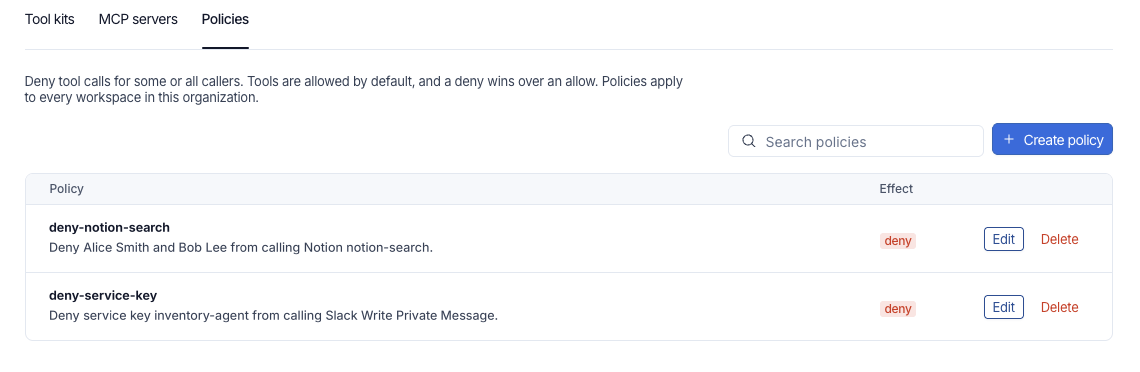
Admins can set policies to control tool use using multiple methods:
- Deny policies block tool use at varying granularities: specific to a user, service key, or a combination. Deny policies can also apply to everyone with listed exceptions. Admins can set these policies at the org or workspace level.
- Approval policies ask the user to confirm a sensitive tool call in their MCP client before it runs. For example, prior to exposing a tool that allows writing to your data warehouse, admins can configure a human-in-the-loop approval requirement. This ensures each time the agent attempts to write to the data warehouse a person is reviewing it.
Visibility: Monitor tool calls in agent traces
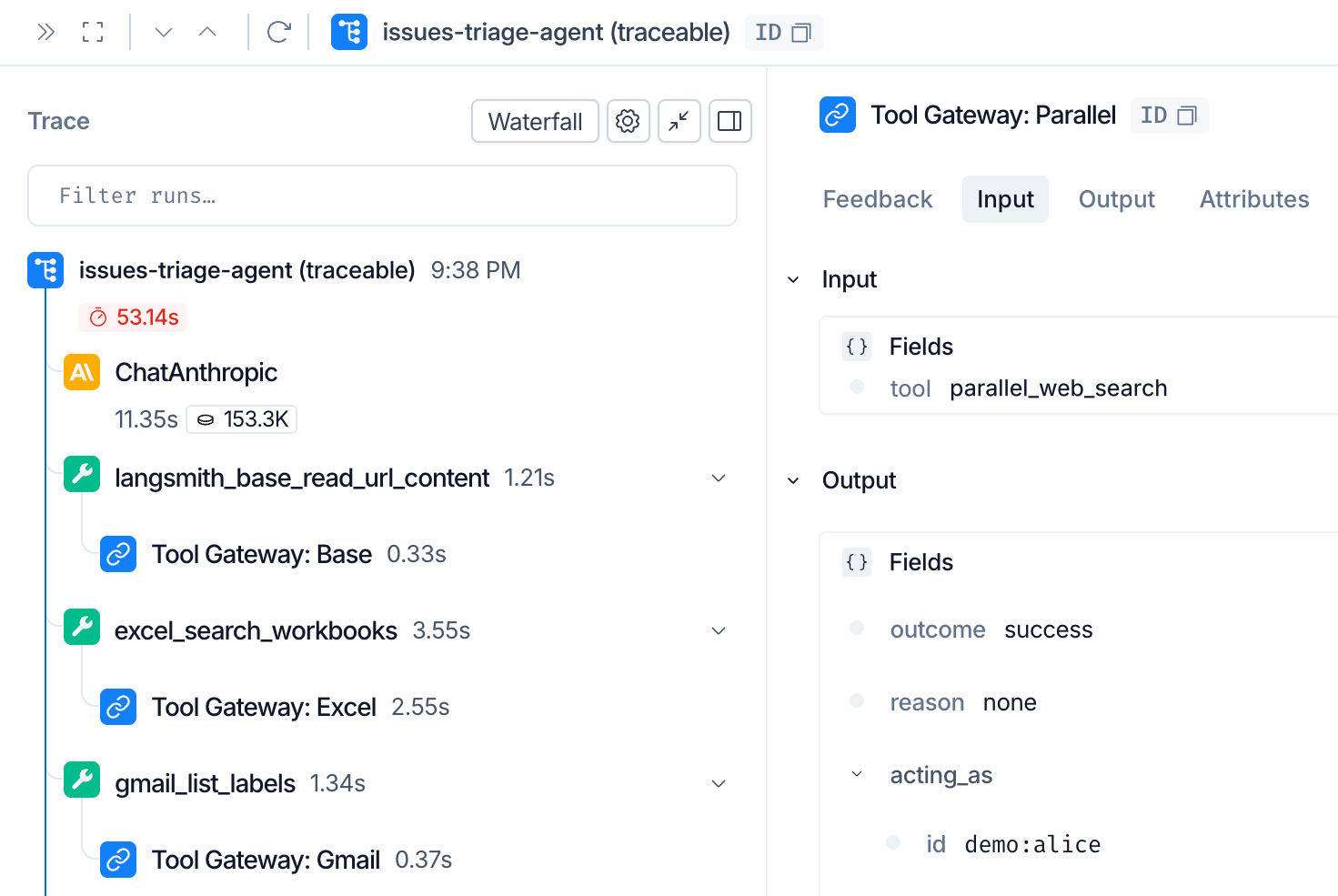
Every tool call is traced in LangSmith with context on the agent conversation, so you can monitor usage and handle audit questions for tool calls, without pulling together traces and logs from multiple platforms. While tool calls always show up in LangSmith traces, with Tool Gateway we get rich information on whose credentials were used, which server was used, latency and outcomes. As a result, debugging is faster, and security reviews have a clear record to work from.
See every tool call
Enable tool call traces for Tool Gateway to record each call's tool, server, user, outcome, and duration. Sensitive data stays out of the record, since data sent to the tool or by the tool is not stored.
Debug in context
Tool calls appear inside the agent's own trace. You can see the step where the agent picked a tool, the identity it used, and whether the call succeeded, all in the same view you already use for debugging.
Give security a single record
On Enterprise plans, the audit log captures which tool ran and as whom, across your organization. This allows security and compliance teams that need to collect logs and monitor to do so simply, from a single unified platform. Questions such as “what tools did this agent use at 3 am last night, and which credentials did it use” become easier to answer.
Built-in tools skip server and OAuth setup for common tools
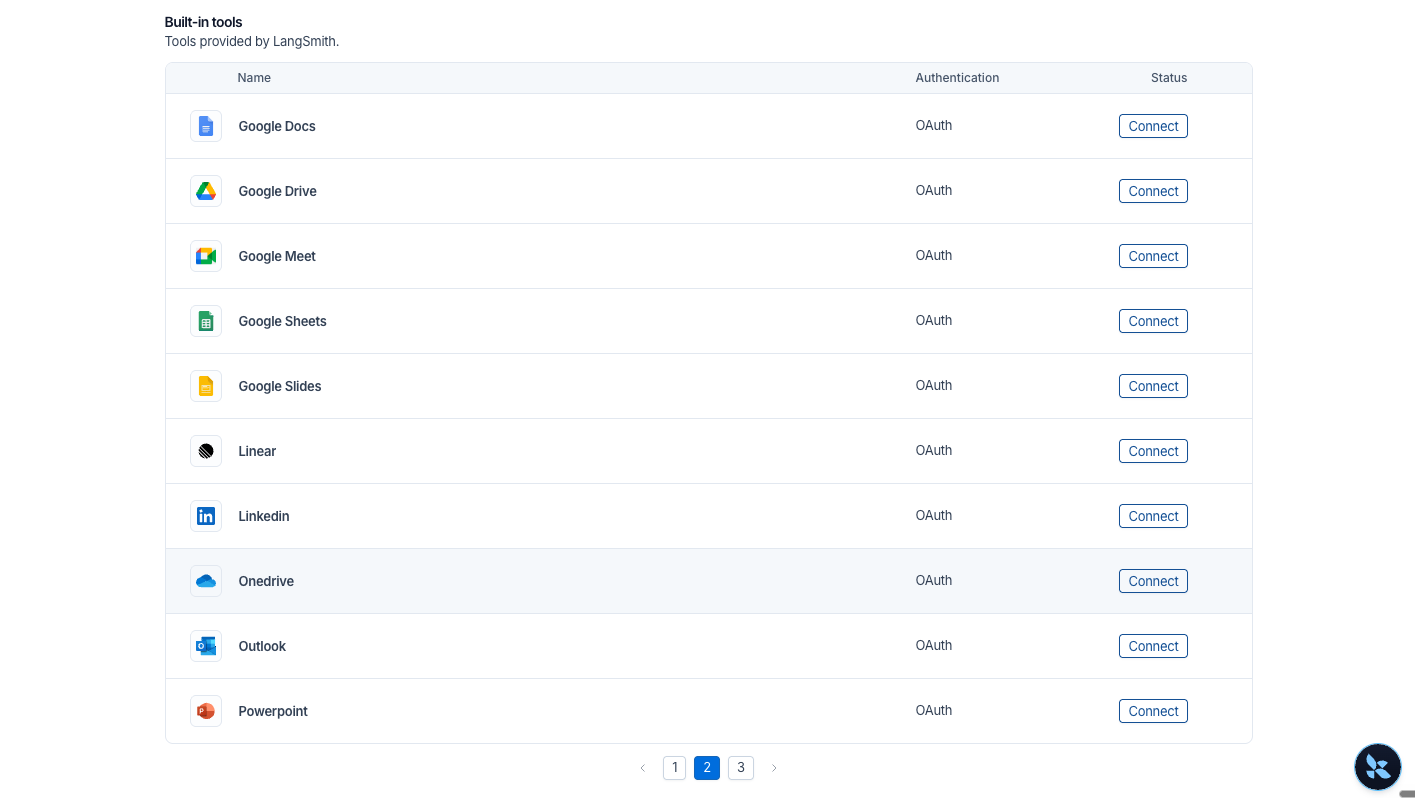
Connect common tools in minutes, without building or maintaining any servers yourself.
Common tools, ready to go
Tool Gateway includes built-in servers that LangSmith hosts, covering the apps most agents need: Google, Microsoft, Salesforce, GitHub, and Linear. For built-in tools, there's no server to run and no OAuth app to register.
Connect once, use anywhere
Turn on a built-in server, connect your account or add an API key, and add its tools to any kit.
Secure, governed tool access for agents in 5 simple steps
LangSmith Tool Gateway provides an easy, streamlined path to adding a new tool server and providing multiple agents access to the tools in it. Once added, a tool server and the tools within are available for use by agents across the workspace, with LangSmith handling identity and authentication on the platform. Here’s how:
- Get access. Open Tools in LangSmith.
- Add a server. Register an MCP server URL or turn on a built-in.
- Connect your account for each tool. Sign in once, or save an API key.
- Build a kit. Pick the tools your agent needs. You get one MCP URL.
- Point your client at the kit URL. Tool Gateway works with any MCP client, including LangChain, Deep Agents, Managed Deep Agents, Claude Code, and Cursor.
Use this quickstart to start today
Deploy persistent agents you can trust
Persistent agents are most valuable when you can trust them to work in the background without oversight. Safe tool access and end-to-end visibility as the default is key to ensuring that trust. Tool Gateway gives agents the access they need, with authentication, guardrails you set, and a record of every call, so your team can focus on building agents rather than maintaining connections.
🛠️ Open Tools in LangSmith and add your first server today!
Read the docs, or talk to our team to get access to deny policies and audit log.