

This is a guest post from Omri Bruchim, AI Engineering Group Lead, monday.com
In early testing, more tools made Sidekick feel more capable. In production, they made it worse. This is the story of how we tore down our first agent architecture and rebuilt Sidekick around bounded responsibilities, sandboxes, and specialized subagents.
We had one general-purpose agent with access to a growing list of tools
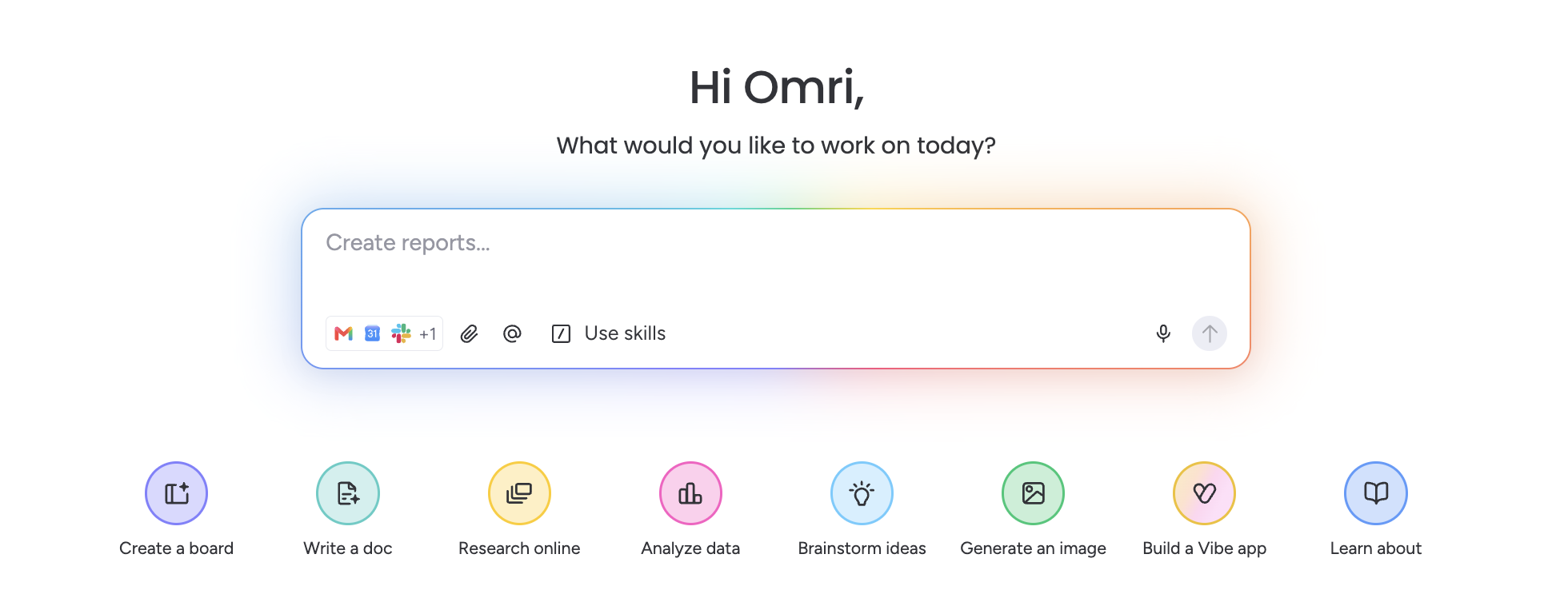
Sidekick is our AI assistant inside monday.com. Our first version looked like a lot of agent prototypes out there: one general-purpose agent, one growing list of tools. That was a useful place to start — it let us learn quickly and confirm what users actually wanted. An assistant that could summarize projects, spot blockers, draft updates, analyze files, update boards, and take action across monday.com and everything connected to it.
Then Sidekick moved into production workflows, and cracks started to show up. Every new tool we added made the system more ambiguous, more expensive to run, and harder to debug. Capability was going up on paper, but it was going down in practice
Our goal was never to build a chatbot that only answered questions about monday.com. We want Sidekick to move from answering, to assisting, and eventually to proactively helping users doing the work. That pushed us to stop treating the agent as one large reasoning loop. We started separating responsibilities across the system: orchestration, permission-aware context retrieval, specialized subagents, bounded tools, and sandboxed execution environments.
This post shares how we rearchitected Sidekick, why sandboxes became an important primitive for the agent, and what we’ve learned from running it in production.
Sidekick has to work across real work context
Sidekick sits inside monday.com, where work context is spread across boards, items, updates, documents, dashboards, meetings, files, notifications, and integrations. A user may ask for a project summary, but the answer might depend on a wide variety of data sources, like a board, meeting notes, or uploaded files.
That's why we couldn't build Sidekick as a chatbot. It needs to understand the user’s goal, gather the right context, respect user permissions, reason across multiple sources, and actually get the work done.
And the requests vary a lot. A simple lookup one minute, a writing task the next, then structured data analysis, then a long-running workflow that produces artifacts. Treating all of those as the same kind of agent problem was one of the first mistakes we had to unlearn.
What our first architecture taught us
Our V1 architecture had one main agent and a growing set of tools, which seemed intuitive at first. If users wanted Sidekick to do more things, we gave the agent more tools. However, In production, we watched every new tool ripple through the whole system in ways we didn't expect. A few patterns kept repeating:
- Tool selection got worse - not better. Similar tools with overlapping descriptions made it harder for the model to pick the right one.
- Tool definitions consumed context. Supplying many schemas and instructions on every turn left less context for the user’s request and the actual work data.
- The agent became too general. A single prompt had to contain instructions for research, content generation, data analysis, board operations, file processing, and other domains.
- Long workflows were fragile. A failure in one intermediate step could cause the entire reasoning loop to lose direction.
- Observability became difficult. It was harder to understand whether failures came from planning, tool choice, tool execution, retrieved context, or the final response.
- Latency and cost grew with complexity. The agent often explored unnecessary tools or repeated calls because it did not have enough structure.
- Testing became increasingly combinatorial. Adding one new tool could affect workflows that appeared unrelated to it.
V1 proved Sidekick could be genuinely useful. It also exposed the limits of a flat architecture. We ran into three barriers:
- Complexity management: Sidekick needed to support very different types of work, but we were encoding much of that complexity inside one agent prompt and one reasoning loop.
- Context. A single request could involve large volumes of board data, several documents, previous conversations, tool outputs, and artifacts we'd generated earlier. Passing all of it through the main model was expensive and, more often than not, counterproductive.
- Reliable execution of multi-step work: Some tasks are not a sequence of two or three API calls. They require exploration, temporary files, iterative transformations, validation, and recovery from partial failures.
LangChain Deep Agents gave us a more structured way to decompose these problems. Instead of expecting one agent to know and do everything, we could give the main agent responsibility to understand the user's goal and delegate bounded tasks to specialized subagents or isolated execution environments.
But the real shift wasn't "moving to multiple agents." It was drawing clearer boundaries between planning, domain-specific reasoning, tool use, and execution.
The architecture, layer by layer
Sidekick today is organized around several layers that bring more structure and control to the agent while also expanding the types of tasks it can take on for users.
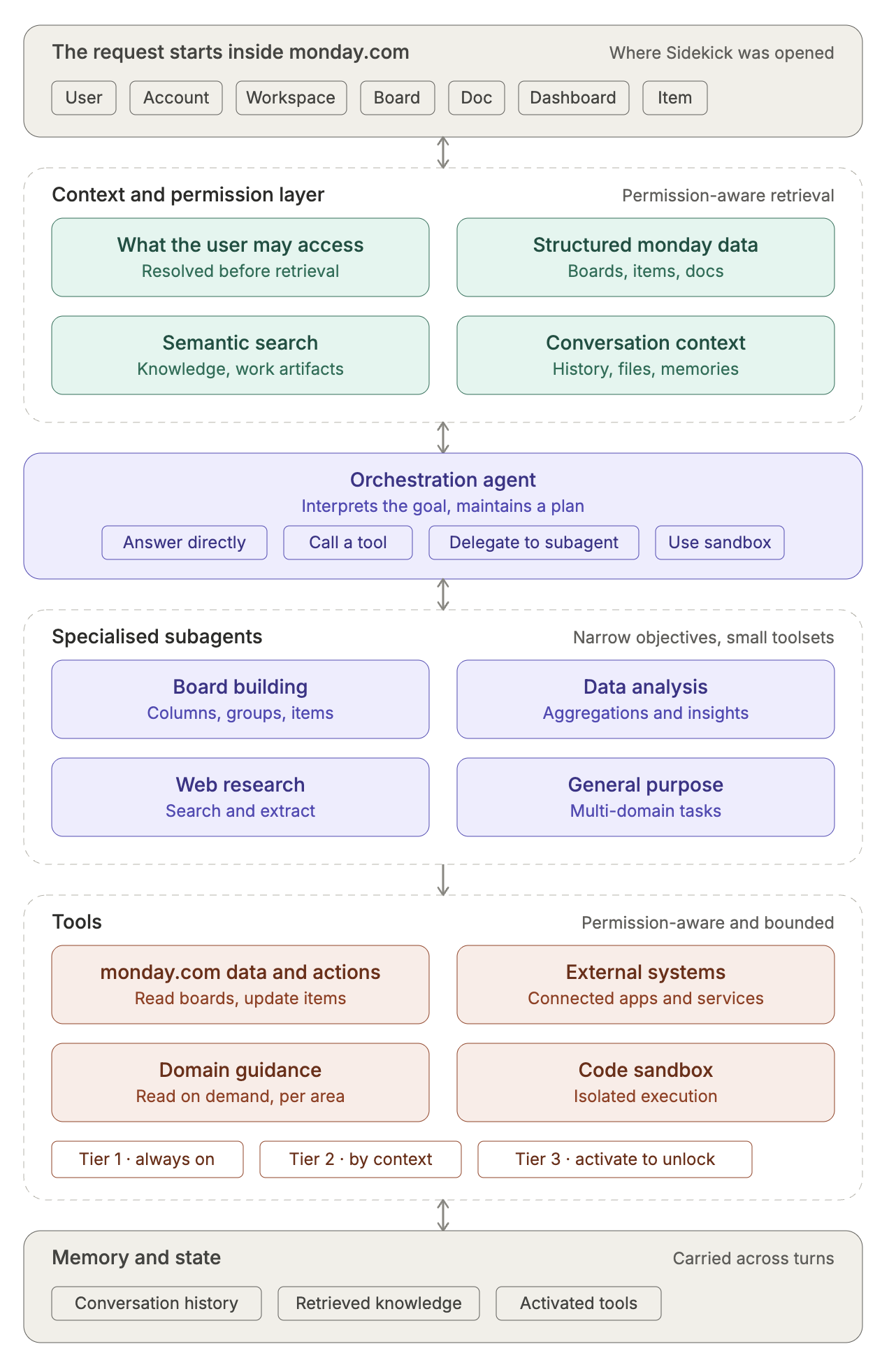
- The request starts inside monday.com, where we already know useful product context: the user, account, workspace, board, document, dashboard, or item where Sidekick was opened. That context helps the agent figure out what the user probably means, based on where they asked.
- Before information is made available to the agent, we resolve what context is relevant and what the user is permitted to access with a context and permission layer. This layer can retrieve structured monday.com data, semantic search results, conversation context, files, memories, and other relevant work artifacts. Permission-aware retrieval is a foundational requirement rather than an additional safety filter.
- The main orchestration agent interprets the user’s goal, maintains a plan, and decides how the work should be executed. For a simple request, it may answer directly or call one tool. For more complex work, it can delegate to a specialized subagent or use a sandbox.
- Subagents perform narrower objectives and use smaller toolsets. For example, a content-generation agent does not need every board-management tool. This gives us better isolation, clearer ownership, and more targeted evaluation.
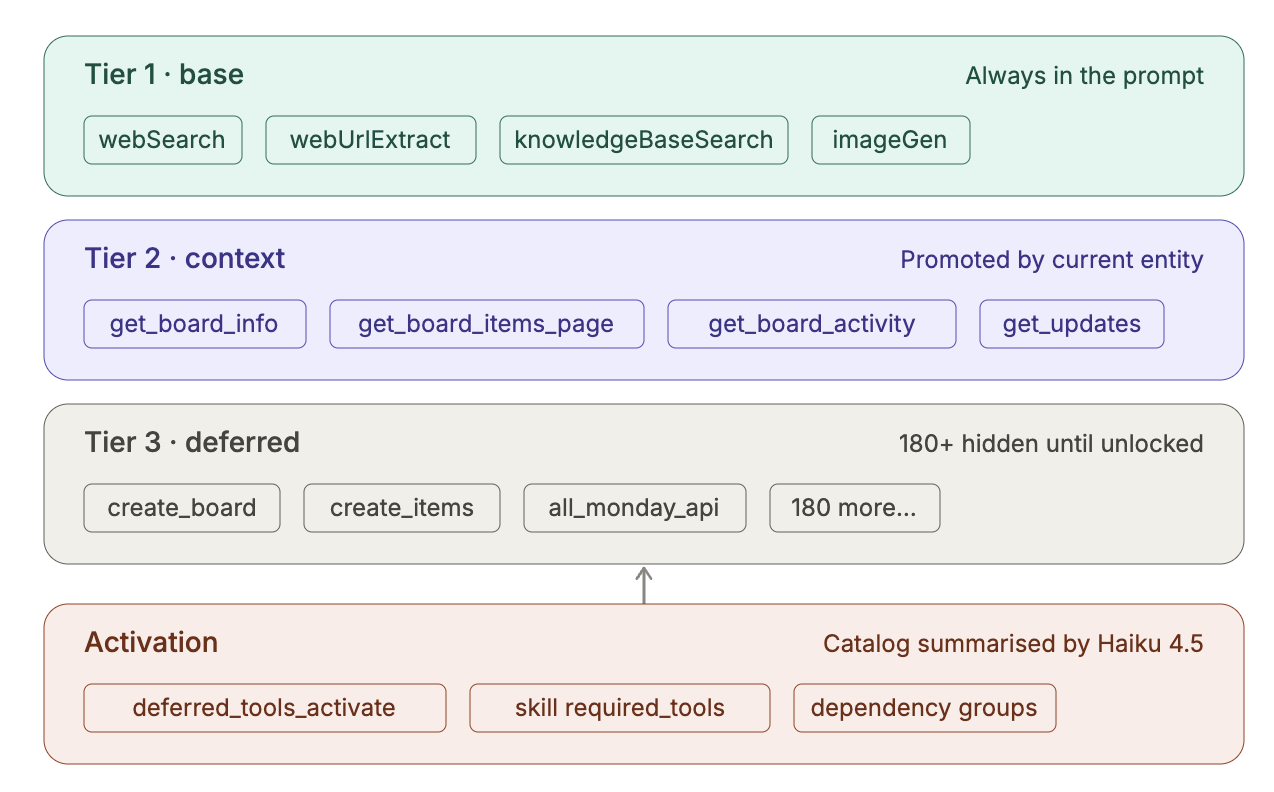
- Tools provide controlled access to monday.com and external systems. They have permission-aware context and work well for bounded operations such as reading a board, searching for documents, updating an item, or triggering a known action. We fixed all our tools with a 3-tier classification system with tiled tool discovery. The agent has to explicitly activate them to unlock their full schema. It's like handing the LLM a menu instead of throwing the whole kitchen at it.
A sandbox gives the agent a place to work
We think of MCP, tools, and sandboxes as complementary.
MCP and tool calling help define what capabilities or resources an agent can access. Tool calling works well when the operation is bounded: retrieve an item, update a column, search for a document, or send an approved message. These actions have clear inputs and outputs.
A sandbox, on the other hand, gives the agent a place to perform complex and iterative work.
Making this distinction changed how we thought about file-heavy and analysis-heavy workflows. If a user uploads several CSVs and asks Sidekick to reconcile them with board data, the agent should not have to pass every intermediate dataframe through model context, which would be inefficient and brittle. It shouldn’t need a separate tool for every possible transformation. A better approach is to provide a temporary workspace where it can inspect files, write code, run it, correct mistakes, and produce an artifact.
This is where sandboxes come in and it’s closer to how a person would do the task. You wouldn't ask an analyst to solve a spreadsheet problem by calling a different API for every column operation. You would give them a workspace, the right permissions, and a clear goal.
In a sandbox, the agent can save the uploaded files, inspect column names, write a script, run it, hit a parsing error, fix the script, generate a chart, and keep the intermediate files out of the main model context. The main agent only needs the result and a summary of what happened.
In this workflow, tools provide controlled access to a user’s business systems, and then the sandbox provides the working environment.
How we decide between tools, subagents, and sandboxes
Instead of choosing one abstraction for the whole request, we choose the right boundary for each part of the work.
So if the agent needs to read a board, update an item, search a document, or send an approved message, that should be a tool because the operation is bounded and auditable.
If the task requires a narrower kind of reasoning — like risk analysis, research, and content generation — we delegate it to a subagent because these tasks benefit from focused instructions and a smaller toolset.
If the work has an intermediate state that would muddy the main agent’s context, we use a sandbox. Artifacts like files, scripts, generated charts, logs, and temporary outputs belong in an isolated workspace, not in the main context window.
Here’s a common example. A user might ask:
Analyze the project data from these three boards and the attached CSV, identify the main delivery risks, and prepare an executive update.
For this task, the main agent retrieves the relevant board data through monday.com tools. Then it delegates risk analysis to a specialized analysis subagent with a narrower objective and a focused context window.
If the CSV requires normalization, joins, calculations, or chart generation, the analysis subagent can use a sandbox. It places the file and selected board data in the sandbox, runs transformations, validates the results, and produces structured outputs or visualizations.
Finally, the main agent or a writing-focused subagent turns those findings into an executive update in the user’s preferred format.
It’s common for a single workflow to use all three mechanisms. Tools provide controlled access to business systems, subagents provide specialized reasoning, and sandboxes provide a working environment for complex execution.
Where LangChain fits
LangChain is part of our orchestration and agent runtime layer:
- LangGraph and Deep Agents for stateful execution, delegation, planning, and multi-step agent workflows.
- LangSmith for tracing, debugging, evaluations, dataset management, and comparing different agent implementations.
- Sandboxes for isolated execution involving files, code, and longer-lived intermediate state.
- Standardized model and tool abstractions let us evolve individual components without rebuilding the entire runtime.
A major benefit is that these pieces work together. When the main agent delegates to a subagent or uses a sandbox, that activity remains visible in the same trace, which is critical when debugging production behavior. When something goes wrong, we need to understand whether the failure came from context retrieval, planning, delegation, tool execution, sandbox execution, or the final response.
We wanted to avoid creating another large internal abstraction layer unless it gave us a clear advantage for monday.com. Deep Agents and Sandboxes were a good fit because they gave us the primitives we needed without forcing us into a rigid architecture: stateful multi-step execution, explicit delegation to subagents, isolated execution for code and artifacts, integrated tracing and evaluation, and the ability to keep using our own tools, retrieval layer, models, and permission controls.
The filesystem-oriented model was especially useful. Agents can already reason well about files, directories, scripts, logs, and artifacts. Instead of designing a proprietary protocol for every intermediate result, we could let the agent use familiar primitives in an isolated workspace. That made sandboxed workflows easier to inspect, easier to debug, and easier to evolve as the system changed.
The value for us is not that the framework removes the need to design the system. In practice, most of the important decisions remain product- and domain-specific. The benefit of LangChain is that we can spend more engineering effort on monday.com-specific context, permissions, tools, evaluation, and user experience instead of rebuilding a generic agent runtime.
What this enables in practice
Our revised architecture with sandboxes has been in production for a few months, and we’re seeing use case patterns emerge that give us confidence in our task boundary approach.
Cross-context project reporting. A user asks Sidekick to analyze a project across boards, documents, updates, and activity sources, then produce an executive summary. Internally, that requires permission-aware retrieval, structured and unstructured data analysis, specialized reasoning, and grounded content generation.
File processing. A user uploads spreadsheets or CSVs and asks Sidekick to combine them with monday.com data, find anomalies, and create a chart or report. This is exactly the kind of task where a sandbox helps. The agent can inspect files, write and run analysis code, recover from errors, and return the useful artifact.
Content generation. A user asks Sidekick to create a launch plan, customer update, or internal announcement based on a launch board and supporting workdocs. The research stage can be separated from the writing stage, which helps preserve provenance and reduce hallucinations.
In all of these cases, the user experiences one assistant, but behind the scenes, the request may involve retrieval, tools, subagents, and sandboxed execution.
Lessons learned
The first version of an agent often looks impressive because it is tested on a narrow, successful path. Production introduces permissions, missing context, ambiguous requests, tool failures, latency requirements, cost constraints, and users who do not describe their goals in the way the system expects.
A few lessons stand out:
- Do not give one agent every capability by default. More tools can make an agent less capable because they increase ambiguity and consume context.
- Treat context as part of the architecture. Retrieving information, filtering it through permissions, selecting what is relevant, and deciding what not to include are core system responsibilities.
- Use tools for bounded actions and an execution environment for open-ended work. Turning every operation into an API or MCP tool can create an enormous and inefficient interface.
- Design for evaluation and observability from the beginning. Agent behavior is probabilistic, and successful API calls do not prove that the user’s goal was achieved.
- Separate user-facing simplicity from internal simplicity. A request can feel like a conversation with one assistant while being executed by several specialized components behind the scenes.
One decision we would make differently is to introduce clearer capability boundaries earlier. The one-agent approach was useful for learning quickly, but we allowed the main agent to accumulate too many responsibilities before separating them.
The architecture will continue to evolve. The specific frameworks and models will change, but the core principles - bounded responsibilities, permission-aware context, observable execution, and rigorous evaluation - are likely to remain.
As AI moves from impressive prototypes into the messy reality of production workflows, the question is no longer just what an agent can do, but how reliably it can do it. Scaling an agent's capability doesn't mean blindly expanding its toolset; it means scaling its structure. By trading a single, overloaded reasoning loop for bounded tools, specialized subagents, and isolated sandboxes, we’ve built an architecture that can actually grow alongside our users' most complex workflows.
We are continuing to build, evaluate, and iterate, but one thing is clear: the future of AI in the workplace isn't just about chatting - it's about getting the work done.
Want to see what an agent that can take actions looks like in practice? You can try Sidekick on monday.com to see how a structured assistant fits into your team's workflows.
